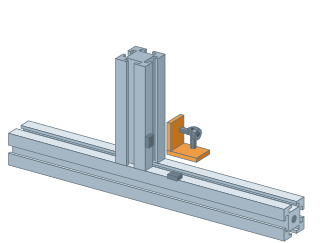
Profile and square tube jointsRight-angle joint with an internal bracketUse the upright to check where the end face meets the beam, how both bracket arms sit and where the screws go.▷ Play animationPlace the uprightUnder Profile joints, select Angle brackets. Move the placement preview onto a flat beam face. Click, drag the upright to length and confirm.Check the cornerClick the bracket. Check that its two arms sit on different profiles and that each mounting hole lines up with an open slot.Inspect the fastenersUse the Exploded view slider to separate the hardware. The screw passes through the bracket arm into the T-nut. Choose a side with enough clearance for assembly.


 Čeština
 Deutsch
 日本語
 Français
 Español
 한국어
 简体中文
 Italiano
 Português
 Nederlands
 Polski
 繁體中文
 Svenska
 Türkçe
 العربية
 Українська
 Dansk
 Norsk bokmål
 Suomi
 עברית
 Română
 Magyar
 Ελληνικά
 Hrvatski