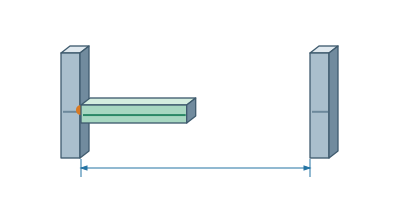
Building and editingInsert a crossmember between two beamsTwo beams define the direction, cut length, and joint at each end.▷ Play animationSelect the first faceFor two already inserted beams, enable snapping and select Crossmember between faces. Click where the crossmember should fit against the inner edge of the first beam.Show the second beamMove the pointer over the opposite beam and click. The crossmember preview is perpendicular to the first face. For square tubes, the cut length is measured between the connector shoulders.Confirm the proposalCheck the cut length and both joints. Select Insert crossmember to finish, or press Esc to cancel.


 Čeština
 Deutsch
 日本語
 Français
 Español
 한국어
 简体中文
 Italiano
 Português
 Nederlands
 Polski
 繁體中文
 Svenska
 Türkçe
 العربية
 Українська
 Dansk
 Norsk bokmål
 Suomi
 עברית
 Română
 Magyar
 Ελληνικά
 Hrvatski