Čeština
 Deutsch
 日本語
 Français
 Español
 한국어
 简体中文
 Italiano
 Português
 Nederlands
 Polski
 繁體中文
 Svenska
 Türkçe
 العربية
 Українська
 Dansk
 Norsk bokmål
 Suomi
 עברית
 Română
 Magyar
 Ελληνικά
 Hrvatski
Illustrated guide
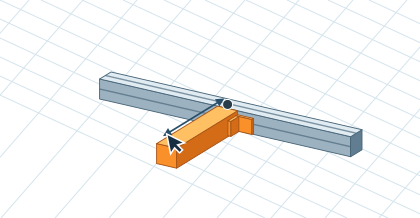
Change the part length
Click the part and enter its new length beside it, for example 300 mm. The orange preview shows which connected parts will move. A marker identifies the fixed point and an arrow marks the moving end. In the anchor and connections settings, choose the start, center or end. Press Enter to apply or Esc to cancel. In Advanced mode you can also drag the end arrow to preview a change.