Čeština
 Deutsch
 日本語
 Français
 Español
 한국어
 简体中文
 Italiano
 Português
 Nederlands
 Polski
 繁體中文
 Svenska
 Türkçe
 العربية
 Українська
 Dansk
 Norsk bokmål
 Suomi
 עברית
 Română
 Magyar
 Ελληνικά
 Hrvatski
Illustrated guide
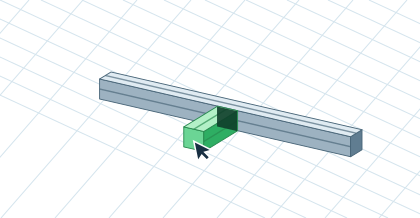
Attach a second profile
With snapping on, move the green preview onto the side face of the first profile. It snaps perpendicular to the face. Click, drag to the required length and confirm. If Angle brackets is selected and the joint is compatible, a bracket is added.